WYSIWYG Editor - Javascript Text Editor
Simple JavaScript WYSIWYG editor for adding rich HTML input to forms and web pages with quick setup.
WYSIWYG Editor - Javascript Text Editor
Simple JavaScript WYSIWYG editor for adding rich HTML input to forms and web pages with quick setup.
Overview
WYSIWYG Editor – JavaScript Text Editor
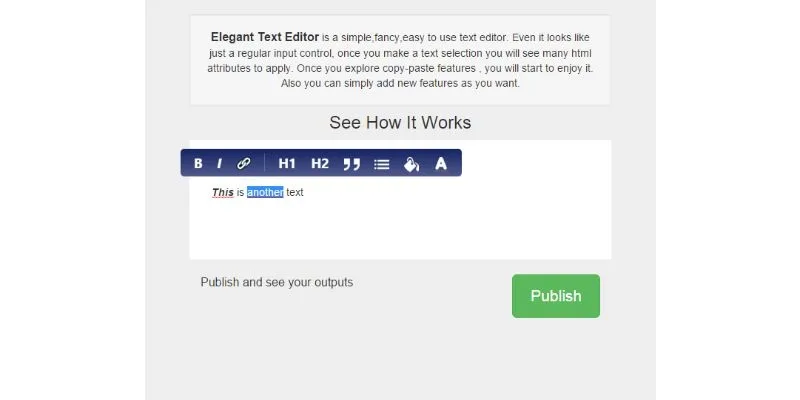
WYSIWYG Editor is a lightweight JavaScript-based rich text editor designed for collecting and editing HTML content through web forms and pages.
The editor uses the browser's execCommand() functionality to provide a What You See Is What You Get editing interface. It can be integrated into contact forms or other web-based pages where users need to enter formatted HTML content.
Rich Text Editing
Users can enter HTML-oriented content through a visual editing interface instead of working directly with raw markup.
Simple Integration
The package is designed for quick setup and can be connected to an existing form using the supplied JavaScript, CSS and editor files.
Web Form Support
The editor can be used with forms that collect content and submit it to a server-side application.
Lightweight Setup
The source describes the editor as simple to use and indicates that it can be set up in approximately five minutes.
Features
- Easy to use
- Converts HTML-related input into a visual editor
- Quick setup
- WYSIWYG editing interface
- Rich text editing for web forms
- JavaScript-based implementation
- Can be integrated into HTML pages
- Can submit edited content to server-side scripts
Requirements
- JavaScript-enabled web browser
- Modern browsers with JavaScript support
- HTML/CSS/JavaScript environment for integration
Other items by this author


| Category | Scripts & Code / JavaScript / Editors |
| First release | 03 October 2026 |
| Last update | 03 October 2026 |
| Files included | Documentation |
| Tags | wysiwyg editor , javascript wysiwyg , javascript text editor , html editor , rich text editor , javascript editor , wysiwyg javascript editor , html input editor , web text editor , javascript rich text , execCommand editor , html form editor , visual html editor , javascript html editor , web page editor |